Wapper - HTML To EXE
A downloadable tool for Windows
Wapper - HTML To EXE
- Windows APP makER -
More Than 'Just Another Wrapper'
Bring your HTML apps and games out of the browser and onto the desktop.
Wapper turns a local web project (your .html file + assets) into a Windows desktop app with a clean, native-looking window, fast! - No browser UI, No tabs, No address bar, and No toolchain headache.
Wapper is as simple as 1, 2, 3.
How to use:
1 - Select your HTML file.
2 - Click build.
3 - You’re done!
Yes, It's really that simple.
NO python and NO coding required!

To celebrate 2000 DOWNLOADS, lets keep the SALE going!
Get Wapper 90% OFF, Today!
Free Version Available!
The free version is the full basic Wapper app, but NO Advanced Settings.
A non-intrusive freebie! No watermarks, No forced overlays or splash screens, No usage limits.
Perfect for: students, hobbyists, indie devs, game jams, or anyone that needs a basic, free HTML to EXE solution.
Look below for the demo download button.
If you like Wapper and the demo helps you out, consider buying the full app.
Thanks either way!
Wapper in action!
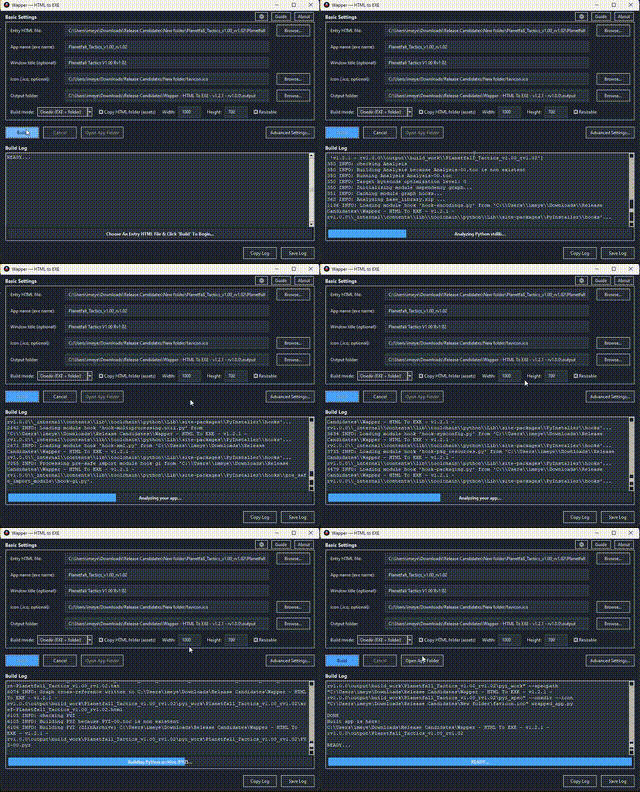

Update Released:
- Updated to v1.4.0 - rv1.1.4 - EXPERIMENTAL - This is a pretty BIG update!
- A NEW CORE FUNCTIONALITY has been added for all users (Free and Paid), Localize HTML! A new checkbox is on the main ui labeled "Localize HTML", when enabled, Wapper does a best effort attempt to localize any online assets from your html (if it has any) and its related files, to allow them to work offline. Including css, js, images, videos, and more. This is not guaranteed to work for every HTML.
- New webview settings - A couple new webview settings have also been added, Allow text selection and Min window size.
- New supported icon formats - You can now use ICO, PNG, or JPG images for the icon. Non-square images are auto-cropped from the center to a 1:1 ratio.
- UI changes and cleanup - The new localize settings are in the advanced settings under the "Localize" tab. I also added some missing labels and cleaned up some other ui.
- Select export location - I added back the browse button so you can now select the Export folder (previously "output folder") to save to.
Any issues, please let me know.
Key features:
- Fast builds: often as quick as 10 seconds on a typical dev machine (project/spec dependent).
- No Python install required: you do not need Python on your PC - Wapper includes/handles the build environment.
- Localize your HTML: A best effort attempt to localize the online assets from your html and its related files, to allow them to work offline. This is not guaranteed to work for every HTML. Note: Localizing assets will make the output project file size larger based on the assets that were localized.
- Any entry file name: pick whichever HTML file should launch first (not limited to the name index.html).
- Multiple icon format support: Use .ico, .png, or .jpg image file to give your exe an icon. Non-square images get auto-cropped to 1:1 from the center, so no pre making an .ico beforehand is required.
- No CORS errors: bypass the 'file://' headaches with the built-in local sever for seamless asset loading. Never worry about 'Cross-Origin Resource Sharing' blocking your assets, again.
- OneDir mode (Recommended): best compatibility + faster startup (ships as a folder)
- OneFile mode: single-EXE convenience (may start slower / may trigger more antivirus false positives)
- WebView2 support + verification tool: includes a WebView2 install check tool, with an option to bundle that same verifier into the app you ship.
- Add a custom splash screen to show before your app/game starts. Add your logo or company name using a static image (jpg, png). Or add an animated into using a gif or a full motion video using a mp4 file. (v1.3.0+)
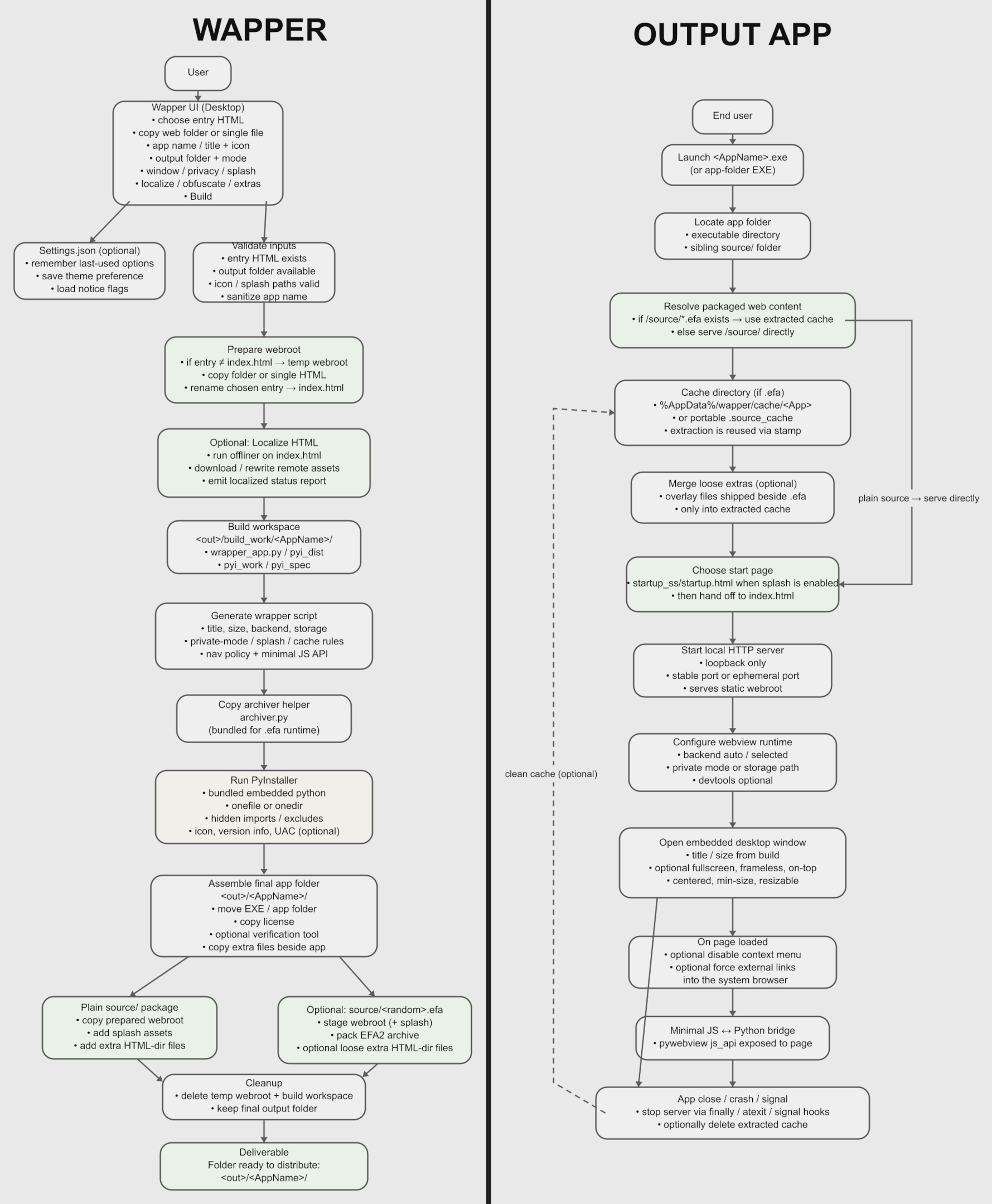
- Optional Obfuscate/Archive: packs web content into a custom archive to deter casual extraction (deterrent, not encryption/DRM).
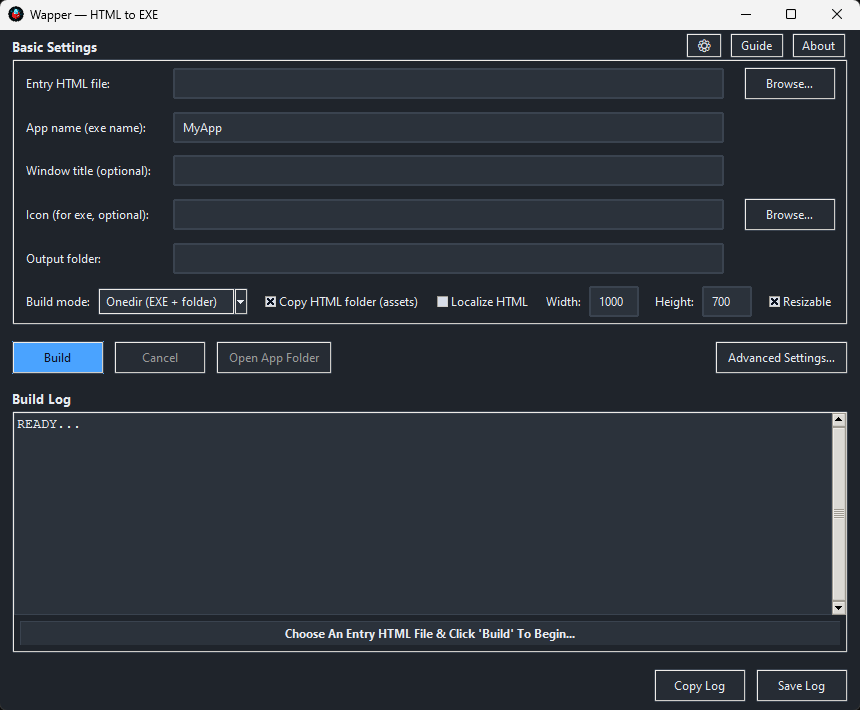
Basic settings:
- Select HTML file.
- Set EXE name.
- Set window title
- Select icon.
- Build modes: OneFile/OneDir.
- Copy HTML folder (assets).
- Window size (height/width).
- Resizable window toggle.
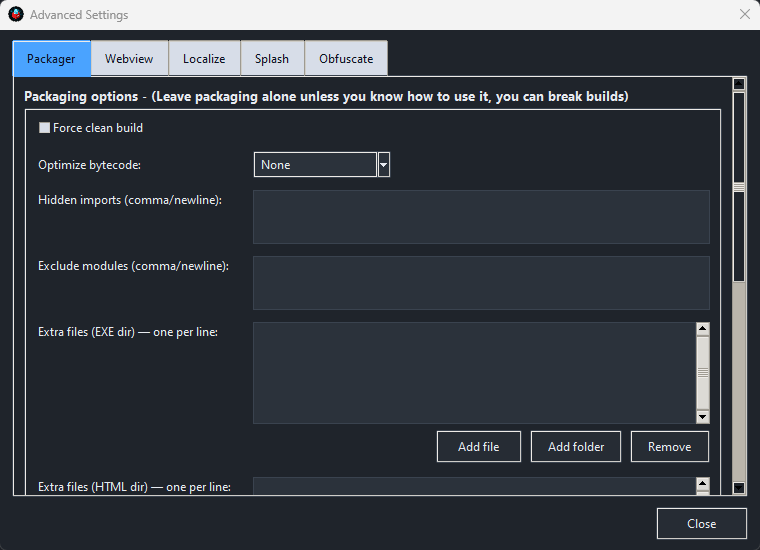
Advanced settings:
Packer:
- Force clean build.
- Optimize bytecode.
- Hidden imports.
- Exclude modules.
- Extra files (EXE Directory).
- Extra files (HTML Directory).
- Product name.
- File description.
- Company name.
- Copyright info.
- Version number.
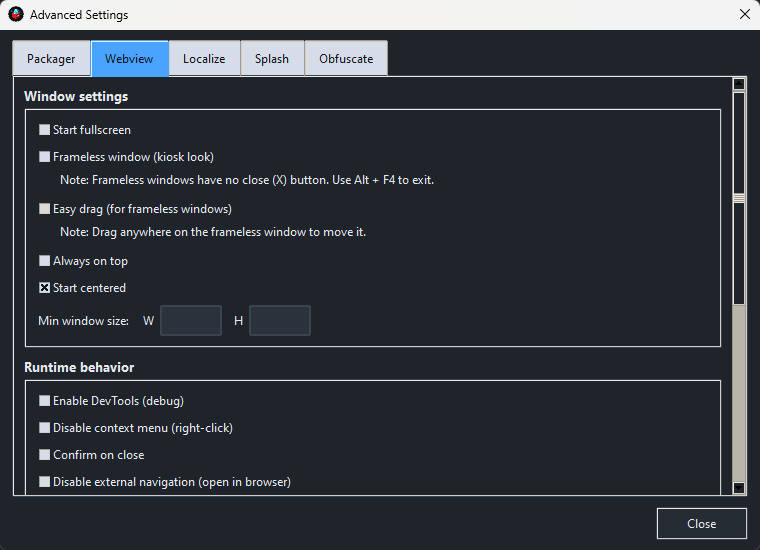
Webview:
- Start fullscreen.
- Frameless Window (kiosk look).
- Always on top.
- Start centered.
- Min window size.
- Enable dev tools (debug).
- Disable context menu (right click).
- Allow text selection.
- Confirm on close.
- Disable external navigation (open in browser).
- Backend selection (auto, webview2, MSHTML (legacy))
- Private mode (no persistence between runs)
- Storage location (cookies/localStorage)
- Include webview2 verification tool in output.
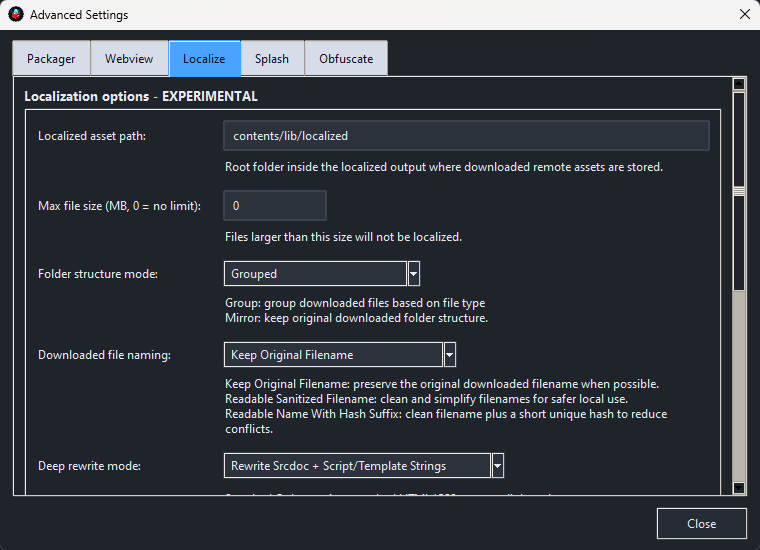
Localize HTML (v1.4.0+):
- Localized asset path.
- Max file size.
- Folder structure mode.
- Downloaded file naming.
- Deep rewrite mode.
- Excluded domains.
- Include only domains.
- Excluded file types.
- Skip URL patterns.
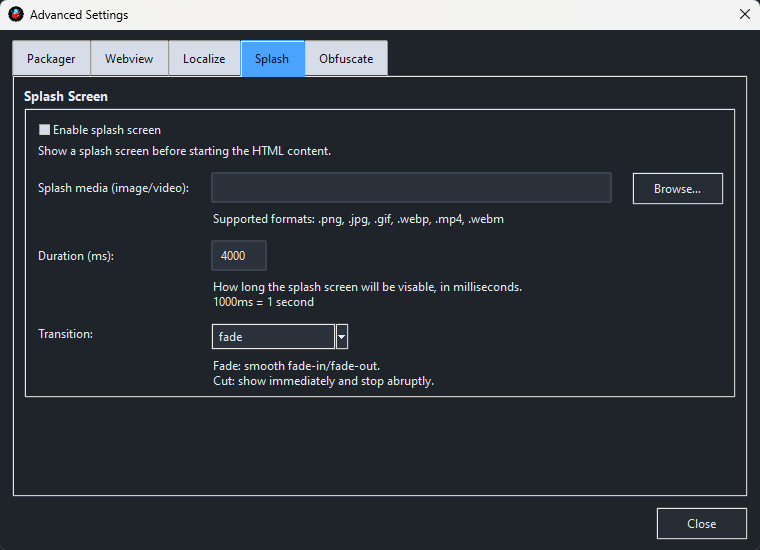
Splash (v1.3.0+):
- Enable splash screen.
- Splash media (jpg, png, gif, mp4).
- Duration (ms).
- Transition (fade/cut).
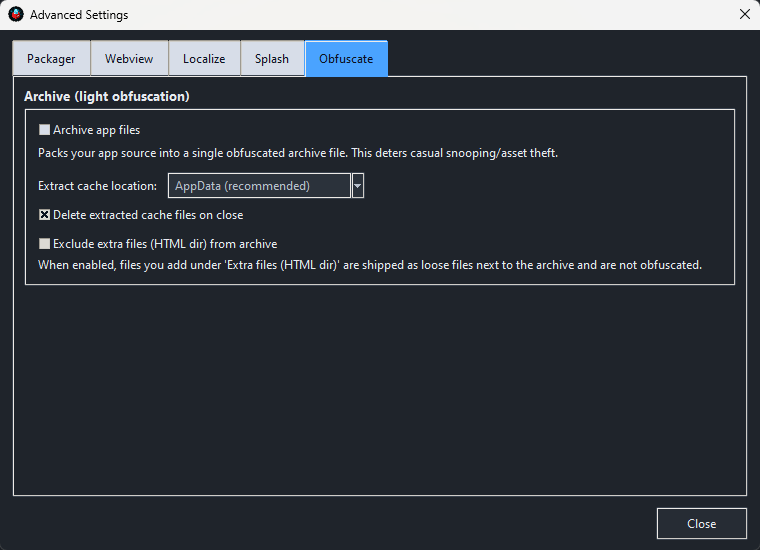
Obfuscate:
- Enable archive.
- Extract location (appdata/portable next to exe).
- Delete extracted cache on close.
- Exclude extra files (HTML dir) from archive.
Real-world overhead (size):
Wapper adds ~<20MB of wrapper overhead to your project.
Example: a 45.8MB web game became 65.4MB after building (+19.6MB).
How Wapper compares (speed, friction, and overhead):
Vs Electron / NW.js: Electron-style apps usually ship a full browser runtime, which often means much larger output sizes (often 100MB+) and a heavier setup/workflow. Wapper focuses on a lightweight wrapper and a fast, click-to-build experience.
Vs PWA: PWAs stay browser-based and depend on web deployment + service worker caching/versioning. Wapper produces a real Windows desktop executable with no browser UI and a local-first distribution path.
Desktop capability: Wapper runs as a Windows desktop app hosting a webview with a local Python-backed wrapper/server, enabling native-style workflows when used - for example file import/export, reading/writing local files your app manages, local background tasks/endpoints, and richer offline/local behavior than a typical browser-based install.
Use cases:
- Ship a web game as a real desktop game: turn a jam build or personal project into something that launches from the taskbar like a proper app - with a custom icon and no browser UI.
- Package small tools and utilities: wrap internal dashboards, generators, trackers, or one-off helper apps into a clean Windows app you can hand to someone without explaining “open this in your browser.”
- Make your portfolio projects feel legit: present demos as desktop apps instead of “a tab next to email,” so they look and feel like real software.
- Offline-first apps and local workflows: distribute apps that run locally and can support things like file import/export, reading/writing local files your app manages, and richer offline behavior than a typical browser install.
- Kiosk / fullscreen experiences: build simple kiosk-style apps for events, displays, classroom tools, museums, or touch-friendly demos using frameless/fullscreen options.
- Quick client deliverables: give clients a single desktop app (or a simple folder build) instead of hosting, deployment, and browser/version headaches.
About the software:
Wapper exists because I got tired of the same choice every time I wanted to "convert" my web project into an exe: spend hours fighting packaging headaches, or pay a high fee to turn a web project into an .exe. I didn’t want a whole new stack or a weekend lost to error logs - I just wanted a fast, easy path from an HTML app or game to a real desktop app.
So I built Wapper to bridge the gap from the web world to the desktop. It’s for any web developer who wants their work to feel like real software - something that lives on the taskbar, launches like a proper app, and shows up with a custom icon - instead of being “just a browser tab” sitting next to your email.
Wapper is also for people who have never even considered desktop deployment because the usual routes feel like too much: learning Python or Rust, setting up complicated tooling, troubleshooting missing libraries, and digging through cryptic logs. The goal is simple: let any web dev become a desktop dev with no barrier to entry - no expert knowledge required, just an HTML project and the desire to ship it.
Wapper is made for web devs who don’t need a massive framework just to ship a small app or game - they just want a basic wrapper that works, fast, with sensible options when they want them.
Requirements:
Windows 10 / 11
WebView2 (for output app to work)
All Windows 11 systems have webview2 installed, however some (very few) Windows 10 systems may not have it installed - Wapper includes a tool to verify/install it.
Notes:
- Please download the free version and test it before buying the full version. Some users have reported build failed issues because of a long path issue with Windows. If that happens, try using a shorter App Name or move Wapper to the root of a drive. Having Wapper in your Downloads folder or Desktop actually puts Wapper pretty deep into the file system and can limit the length of the App Name that can be used before hitting the 260 character path limit in Windows.
- Like many EXE builders/wrappers, antivirus false positives can happen, especially in single-file modes. Wapper defaults to safer options (OneDir, archive off) to minimize risk.
- If you have trouble extracting the zip, try moving the zip to the root of a drive and extract it there. Windows has a long file path constraint that may prevent the zip from extracting some nested folders/files. You may also need to open the zip properties and toggle "Unblock" near the bottom of the properties window to allow for some dll files to be safely extracted without getting blocked by Windows.
- Transferring the output app to another machine may cause it to be blocked on that machine. If that happens, you should transfer the files using a zip or other archive, then right clicking on the zip/archive and open its properties and look for "This file came from another computer and might be blocked to protect this computer" and tick the "Unblock" checkbox, otherwise some dll files can be blocked after extracting the zip/archive.
- If your app saves files from the output app’s WebView2 window, your HTML project’s Save/Download/Export button must open a Save As dialog so the user can choose a location. WebView2 does not support blind-saving with its default save behavior.
- OUTPUT COPY LOOP WARNING - Do not set the output location to be inside the same folder as the HTML if you are copying the HTML folder or the Wapper will go into a loop of copying the files to the output but always finding more files as it copies the files to the output, since it will be copying the output as well.
Changelog:
Updated to v1.2.2 - rv1.0.1:
- Fixed a path for the archiver that I forgot to change to work after I froze Wapper's launcher. But the archiver works again.
Updated to v1.3.0 - rv1.1.0 - Beta:
- Added a new Splash tab in Advanced Settings for adding a splash screen that will show before your app/game. Supports images and video (see description above). The previous version will still be available to download as well.
Updated to v1.3.2 - rv1.1.2:
- Full and Free version - I fixed a couple of bugs. One potentially a big bug. I found that on some machines, if the user selects the wrong output location, Wapper could break and get stuck due to a long file path. I removed the Browse button to select an output location to prevent this bug from happening. You'll need to use the default output location, for now.
Updated to v1.3.4 - rv1.1.3:
- I fixed a bug with the private mode setting. The way the port was randomly chosen, the saved data was not being found. I fixed it so when private mode is ON, the port is still random, but if private mode is OFF, the port is deterministic. The name of your HTML file, prior to building the exe, will determine the port it will be on. So the same name will always use the same port
Updated to v1.4.0 - rv1.1.4 - EXPERIMENTAL :
- This is a pretty BIG update! A new core functionality has been added for all users (Free and Paid), Localize HTML! A new checkbox is on the main ui labeled "Localize HTML", when enabled, Wapper does a best effort attempt to localize the online assets from your html and its related files, to allow them to work offline. This is not guaranteed to work for every HTML.
- New webview settings - A couple new webview settings have also been added, Allow text selection and Min window size.
- New supported icon formats - You can now use ICO, PNG, or JPG images for the icon. Non-square images are auto-cropped from the center to a 1:1 ratio.
- UI changes and cleanup - The new localize settings are in the advanced settings under the "Localize" tab. I also added some missing labels and cleaned up some other ui.
- Select export location - I added back the browse button so you can now select the Export folder (previously "output folder") to save to.
Purchase
In order to download this tool you must purchase it at or above the minimum price of $1.99 USD. You will get access to the following files:
Download demo
Development log
- Wapper - HTML To EXE - The Return Of The Export Folder OptionMar 19, 2026
- Wapper - HTML To EXE - A Tiny UI UpdateMar 18, 2026
- Wapper - HTML To EXE - A Huge Update To V1.4.0 - Localize HTML Added! - EXPERIME...Mar 16, 2026
- Wapper - HTML To EXE - Another Bug FixMar 08, 2026
- Wapper - HTML To EXE - Updated To V1.3.2! - Bug FixesMar 06, 2026
- Wapper - HTML To EXE - New Feature Added - Splash ScreenFeb 24, 2026
- Wapper - HTML To EXE - Demo Added!Feb 21, 2026
- Wapper - HTML To EXE - Fixed archiver path issueFeb 20, 2026
Comments
Log in with itch.io to leave a comment.
found one issue, which im not sure its possible to fix it by calling a javascript?
The sound is muted out until you click on the game. Rest seen working as inteded and im like it.
This is strange when its should have to start focus. hmm.
Actually, having the sound muted before a user interaction is normal. That is how all html games work. Browsers don't allow sound to play just because the page loaded. Browsers prevent sounds from auto-playing to stop them from startling the users. And Wapper uses Wenview2 which is just a ui-less browser, basically. So any standard browser behaviors apply. Cheers!
Hey,
It keeps saying "Build failed" what should I do?
It depends on what is happening. Most commonly the app name is too long. Try a short name or choosing a location closer to the root of the drive to export to. If that doesn't work, try moving Wapper to the root of a drive. Windows can have a long file path issue. Having Wapper in the root of a drive gives it a longer path it can use to output the exe. Having Wapper in a location like your downloads folder or desktop actually puts Wapper pretty deep into the folder structure on the drive. And windows has a limit on how long a file path can be, so when you have Wapper somewhere like the downloads folder, the output path to the exe can become too long due to how Wapper uses a built-in toolchain with deeply nested folders. So, having a short app name or moving Wapper will Hopefully fix it for you. You can rename the exe after building, as well.
Edit:
I just looked into it, and you can increase the file path length limit from 260 characters to 32,767 by enabling "Win32 long paths" in Windows settings. I haven't tested that myself, but that should fix any long path issues, I would think.
Okay thank you
Hi,
What is the specifications for the Icon (.ico) file?
I tried making a multi-sized icon starting at 256 x 256 and when selected the Wapper program shut down.
Update: I am now running Wapper with Administrator and now it is doing everything without bombing out. even handled the 256 x 256 icon file.
Glad to hear you got it working. It should work with any regular ico, png, or jpg file. It can make the ico for you from regular images. I usually use 256x256 multi-size ico, too. Cheers!
Do you have an updated User Manual for version 1.4?
If you redo it, please leave the background white, I don't like wasting all my black ink printing it out.
Thank you
The new manual is up, and it is a light version. Cheers!
That was quick - Thank you
Hi, In the OneFile mode the created exe will not run without the other file(s)/folders in that final folder eg. license and/or source.
Is it possible to actually get it so that there is just the exe file.
Also, please place a donate button on the Wapper website.
Thankyou for a great program
Hi RickiRu!
Unfortunately, no. The source folder is your original files and need to be there for the exe to serve them in the webview window. Wapper creates a custom webview wrapper for your files to be served to, that's what the exe is. It looks in the source folder for the files to open in the window.
As for the license folder, you should be able to remove the license folder, but you should leave it in there if you plan on distributing the app/game. The licenses are required to distribute the underlying libraries that make the output app work. Wapper automatically adds the needed license files to make it easier for you.
Thank you for the question and the kind words!
State this somewhere obvious. The whole reason I purchased was to hide my files in an exe, if they have to be there then what is the point in this? I can't even unzip the download because it keeps saying some of the file names are too long.
I'm sorry you're having trouble extracting the files. Try moving it to the root of a drive then extract it. Windows has a weird thing about long paths to files. The deeper into a drive it is, the more likely it will fail to extract. Also, you may need to open the zip properties and look at the bottom for the unblock toggle. It may get blocked otherwise.
As for the hiding your files, it is mentioned, that is what the obfuscation settings are for in the advanced settings. The app will pack your original files into a custom archive that won't open in normal zip software like 7zip or others. It uses a custom archive I made for this app. Also, just curious, how did you figure out it wouldn't put your files in the exe without testing it? If you can't extract it then how could you test it?
I hope you get it figured out.
Feel free to get a refund if you need to, no worries.
Cheers, EyeFly.
Could we get Linux support to export HTML to an AppImage? I've tried running exported sites in WINE and Proton but either way gives me a Python error.
Unfortunately no. It is Windows and webview2 based. I can't make it work on Linux without remaking Wapper. It requires webview2 to run the output apps. Sorry.
Is it possible that new updates to the game we are making are automatically updated on the player's already installed previous version? Is there an automatic updater in this app? So when a player installs a new version of the game or build, it simply automatically upgrades without losing the player's progress? Because I make the game in stages or upgrades. Thanks!
The data is saved to the port that is used for the app. So if you have private mode on, the port is randomized. So if you want the same data from the saves, don't use private mode and always set the app name the same in Wapper. The name is what is used to select a port when private is off. So as long as you keep using the same name then the same port will be used. I hope that helps.
I'm not sure how it would work if you are releasing a game with different parts that are played independently but use the same save data. But as long as the way the save data is located in the local storage is the same for all parts then if they're using the same port then it should work. And remember, it's the name that you set in Wapper that determines the port. And you can rename the EXE after building it if you want it to have a different name. Only the name during the build matters for the port. You can change the name of the EXE after and it will still use the same port.
Ok, so if I understud, always use same name in Wapper!? ok, Thanks!
Is there any chance to implement Mozilla Firefox backend? Some visuals are displayed differently on Edge backend, so they get messed up. I'm not too familiar with that kind of stuff, so I might have not explained it correctly in order for you to understand what I mean
Unfortunately, no. Webview2 is edge/chromium based. Sorry.
No worries
Hi! Does it support triggering downloads? I need this for exporting image files out of the application
It only will work if you make a save dialog box open so you can choose a save location. Blind downloads (just clicking a button and letting the file get auto-saved) don't work. That's a quirk of Webview. There is no easy way to capture downloads and redirecting them from within a webview window. So using the save dialog box is the best way to go.
Thank you for a quick reply! Would be possible to get in touch with you on Discord, or email? I might have some suggestions at some point. I'll also play around with this tool a bit more, and donate additional money to you. Thank you again
My discord name is itseyefly (eyefly).
Thank you!
I just purchased your tool, @EyeFly! Hope this works well for my web games and tools. Glad see to see you've done regular updates
Are there a lot of other things in "C:Users/jacks/Downloads"? It may be lagging because it is copying a lot of stuff over. The HTML should be in a folder with only its own assets (if it has any). Otherwise if you have "Copy HTML Folder (assets)" toggled on, it will copy everything from the folder, including all subfolders (your download folder in this case). So put the HTML into a folder of its own with only its assets. If it is only an HTML file with no other assets, you can turn off copy HTML folder.
You can also try removing the spaces from the entry HTML name and replace them with underscores, and remove the brackets (). It should work without that, but it's worth a try.
I hope this helps.
ottimo lavoro: funziona egregiamente!
Very very cool - as someone who has always wanted to make a game and can make websites, this is such a sweet tool. Works great in my testing.
Awesome! I'm glad you like it! I hope you get some good use out of it.
Comments/Feedback/Bug Reports are all welcome and appreciated! Thanks, EyeFly.
That's strange. I haven't seen that happen before. I used 7-Zip to make the zip file. I don't know what you're using to unzip it, but you may need to use a different program to unzip it. The path too long part, I don't know. I know Windows has a limit on path length. But since you tried different locations, I'm not sure. It may be related to the program you're using to unzip it.
Edit:
I looked into the path too long part and if you're using the built in Zip package handler in Windows, it may not work because of the deep nested folder structure. 7-Zip allows for deeper paths than Windows default zip handler. So try 7-Zip to unzip it.
I hope this helps.
I just noticed the edited version of your comment. I'm glad you got it extracted. I hope you don't have any other issues. Cheers!
I still can't get the experimental version to unzip, path too long. However, everything else seems fine with the older one. Thank you for the program! :)
I'll keep checking a few things but I can't change the path of certain things. Some libraries in the app are hard coded with those paths and I can't change them without breaking stuff. Hopefully it's just an edge case on your PC. The strange thing is that the file in the error is a file that was already there in the old version too. Nothing changed with that part of the app in the experimental update. So I don't know why it would extract in one version but not another. Thanks for the heads up though, it's appreciated.
Try using 7-Zip to unzip it - That worked for me.